Move.ai · 2022—2024 · Mobile app · Multi-device recording

Motion capture without the studio

An iOS app that turns a handful of iPhones into a markerless motion capture system — replacing a rented stage, a marker suit, and a mocap engineer.

The Talkie.ai scenario designer on the brand’s purple wave background

“You can see it's almost a one-to-one calibration with the game rig. I was really impressed off the bat — because it tells me that through this video-based technology it is getting a very accurate calibration of the talent skeleton.”

Animation Director, EA Motion Capture Studio, presenting a side-by-side test of our system against optical mocap at SIGGRAPH 2022

RoleSenior Product Designer
Team20 people
TimelineJune 2022 – April 2024
ProductMove Multi-Cam - iOS app
OutcomeBrought motion capture within reach of indie developers, small studios and individual creators

The short version

Motion capture had a floor price and a fixed address: rent a stage, book an engineer, spend 30–60 minutes suiting and marking an actor, calibrate, shoot. We were building the opposite: point a few phones at a performer anywhere and get usable 3D animation out.

The design problem was not on the screen. It was in how someone physically arranged cameras in a room, and whether they performed a calibration step whose purpose was invisible to them.

A capture set up wrong was unrecoverable: the performer had already performed, and unlike most software failures there was no free retry.

So the interface's real job was preventing an unrecoverable failure that happened outside the interface. That is why every decision below is about giving an operator information they could not otherwise have, in a room I would never see.

Six decisions

01

Standardize on iPhone — and keep re-testing it.

Our pipeline needed lens and calibration metadata; Apple exposed it consistently, most Android devices didn't. Samsung also shipped different camera modules within one model line. Fixing the hardware meant every accuracy question had one answer instead of two.

Tradeoff: iPhones are expensive, and we lost users who asked for a cheaper route.

What I'd defend: we re-ran the Android comparison repeatedly across a year, because being wrong meant losing a whole segment. It stayed a decision to re-test.

02

One phone as host, not a laptop.

iOS peer-to-peer let one device stream live preview from every camera and coordinate the session, keeping the kit to one device type.

Tradeoff: one device records nothing, and we recommended four when users hoped to hear two. We held that line: a user who buys the minimum, gets poor results and concludes the technology doesn't work is worse than one who balks at the price.

03

Teach calibration rather than gate on it.

The biggest failure point in early release. We explored hard-blocking, but processing ran in the cloud and users were often offline, so the app could confirm a calibration was recorded, never that it was good. A gate on an unverifiable check stops the wrong people. So we shipped a dismissible notification with an on-demand video, at the moment of use. The step's purpose was invisible, so it read as skippable; making the button louder wouldn't have helped.

Tradeoff: experienced users get reminded forever, and poor calibrations still got through.

Result: it stopped being the top failure our sales engineers reported from the field, though users whose calibration merely passed still got poor animation. Quality was a gradient the system could only read as binary.

04

Split the control path from the data path.

Originally every phone sent footage to the host, which reviewed and uploaded. Coherent, and it failed in the field, where long transfer chains met congested Wi-Fi. Neither obvious option was right; the premise worth breaking was that review and transfer had to travel together. Preview became a stream, so the host kept full review. Upload became a command each phone executed on its own footage. Same one-tap experience, no extra hop for heavy data.

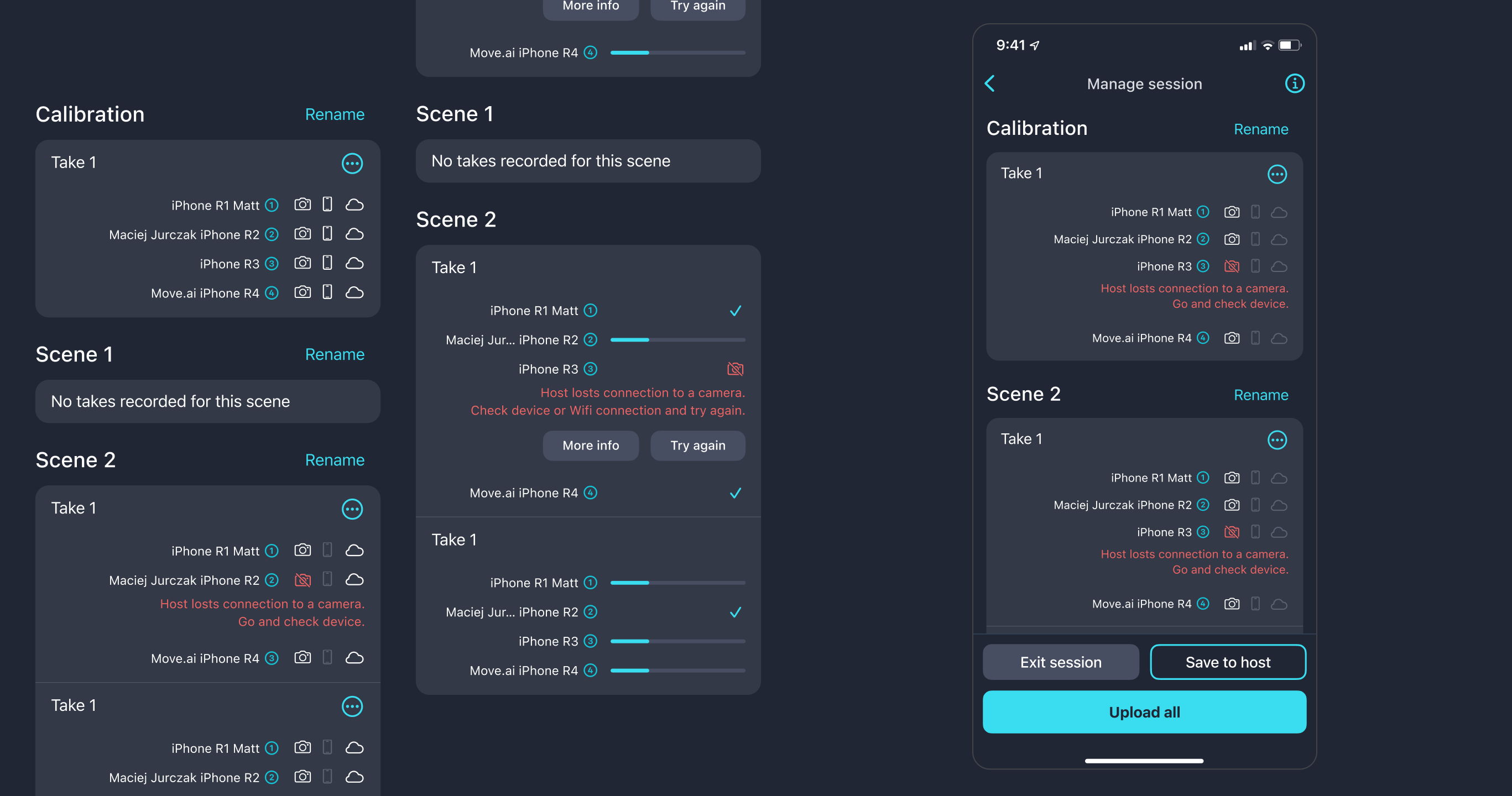
Tradeoff: partial failure became possible, so we designed for it, with per-device status, progress and retry.

05

Decouple capture from connectivity.

Blocking on upload would have reimposed the constraint we were selling against.

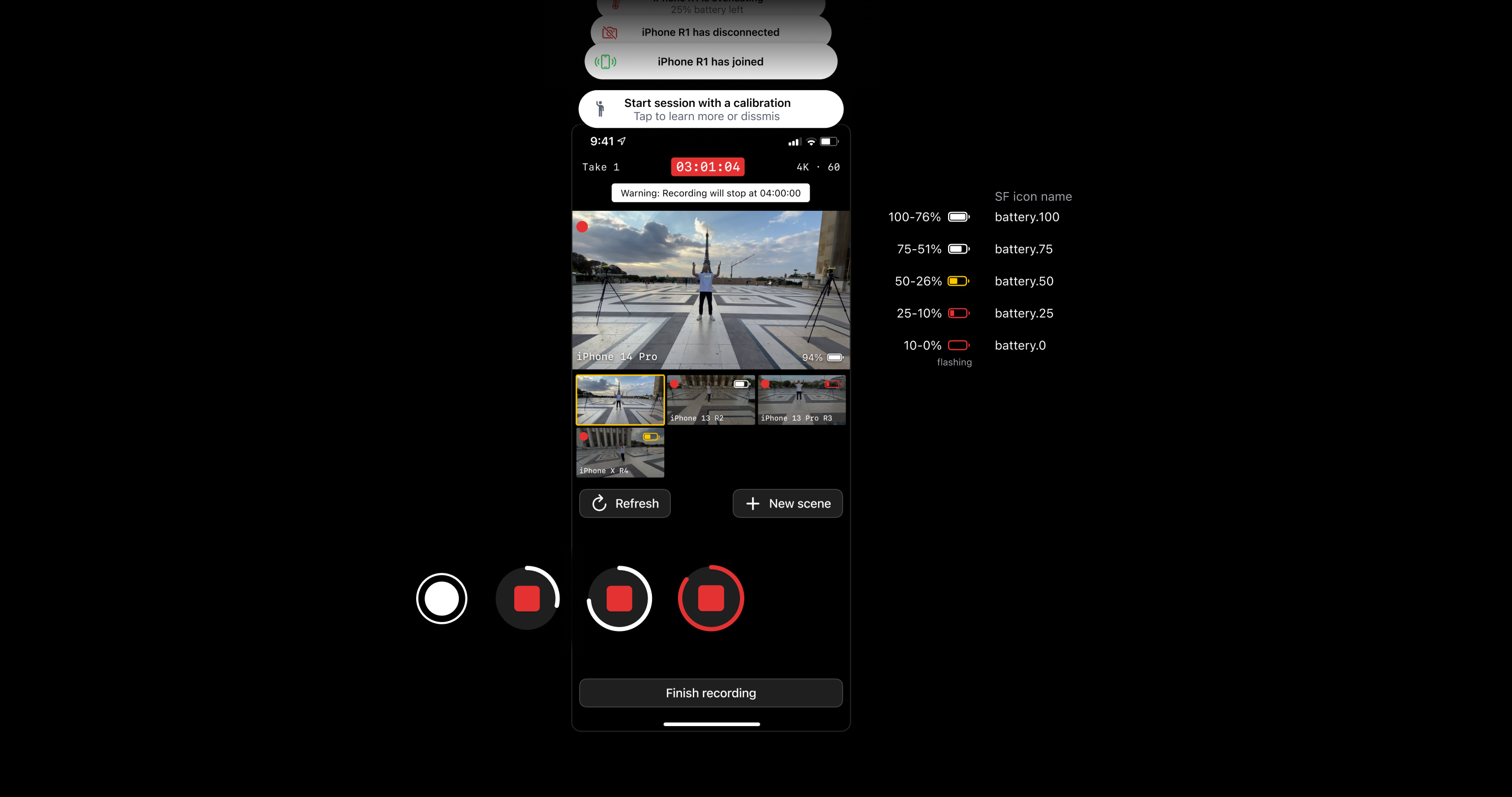
Tradeoff: not the one I predicted. Nobody worried their footage was unsafe; phones filled up instead. Two sound decisions collided. Standardizing on iPhone made the kit expensive, so users bought minimum storage; offline capture then asked those devices to hold large files indefinitely. Available storage became a first-class status on the host screen as a result.

06

Surface device thermal state.

In my first month the team built the first prototype at a hackathon in Portugal, on a tennis court in 35°C. Phones overheated.

Tradeoff: on a single-device app that's visible, because it's in your hand. With three phones on tripods behind you, you find out after the take is ruined. More status on screen was the price of knowing.

The three-column scenario designer: modules and intents, step list, and the Question configuration panel

The shipped app

The three-column scenario designer: modules and intents, step list, and the Question configuration panel

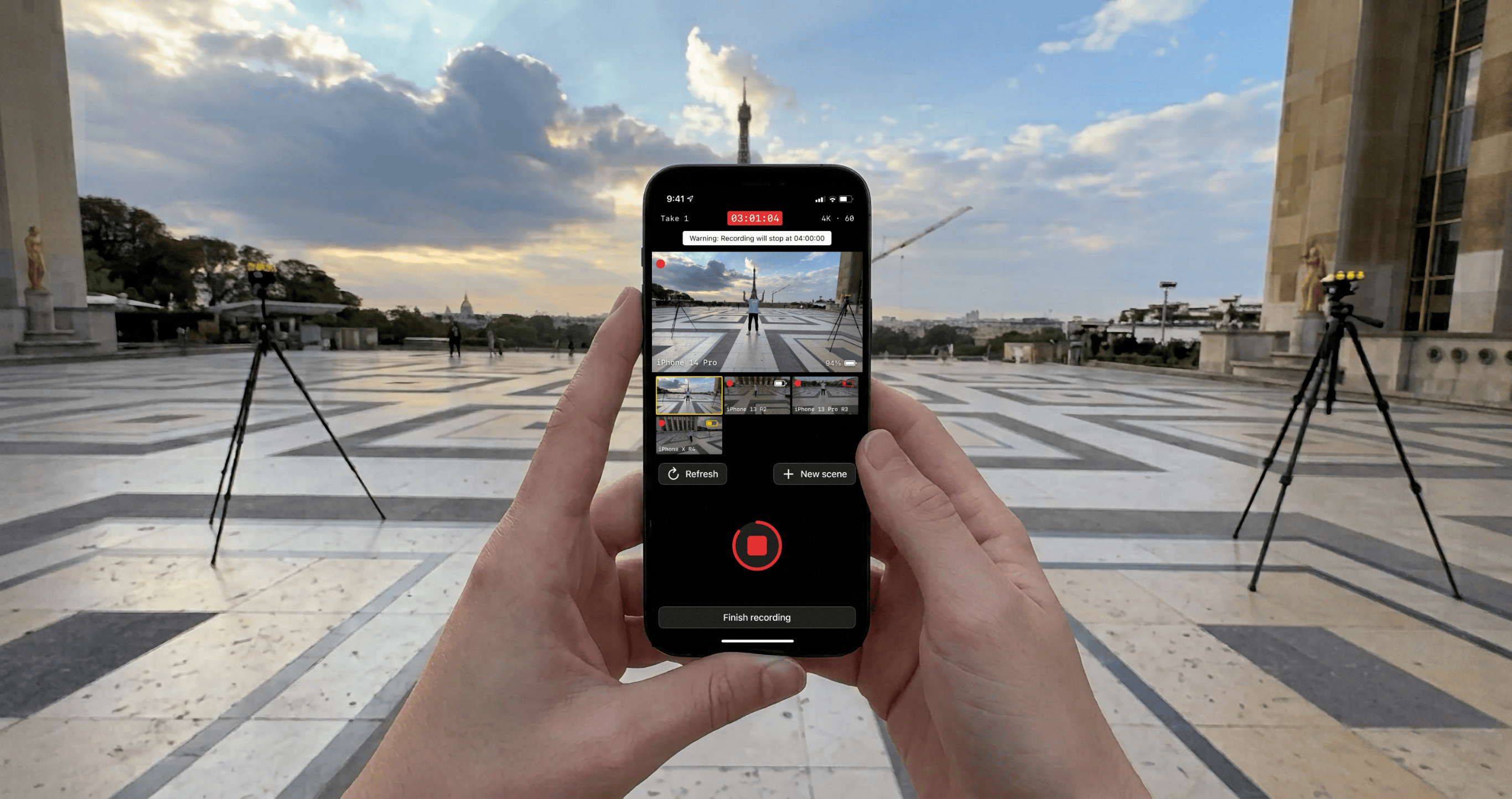
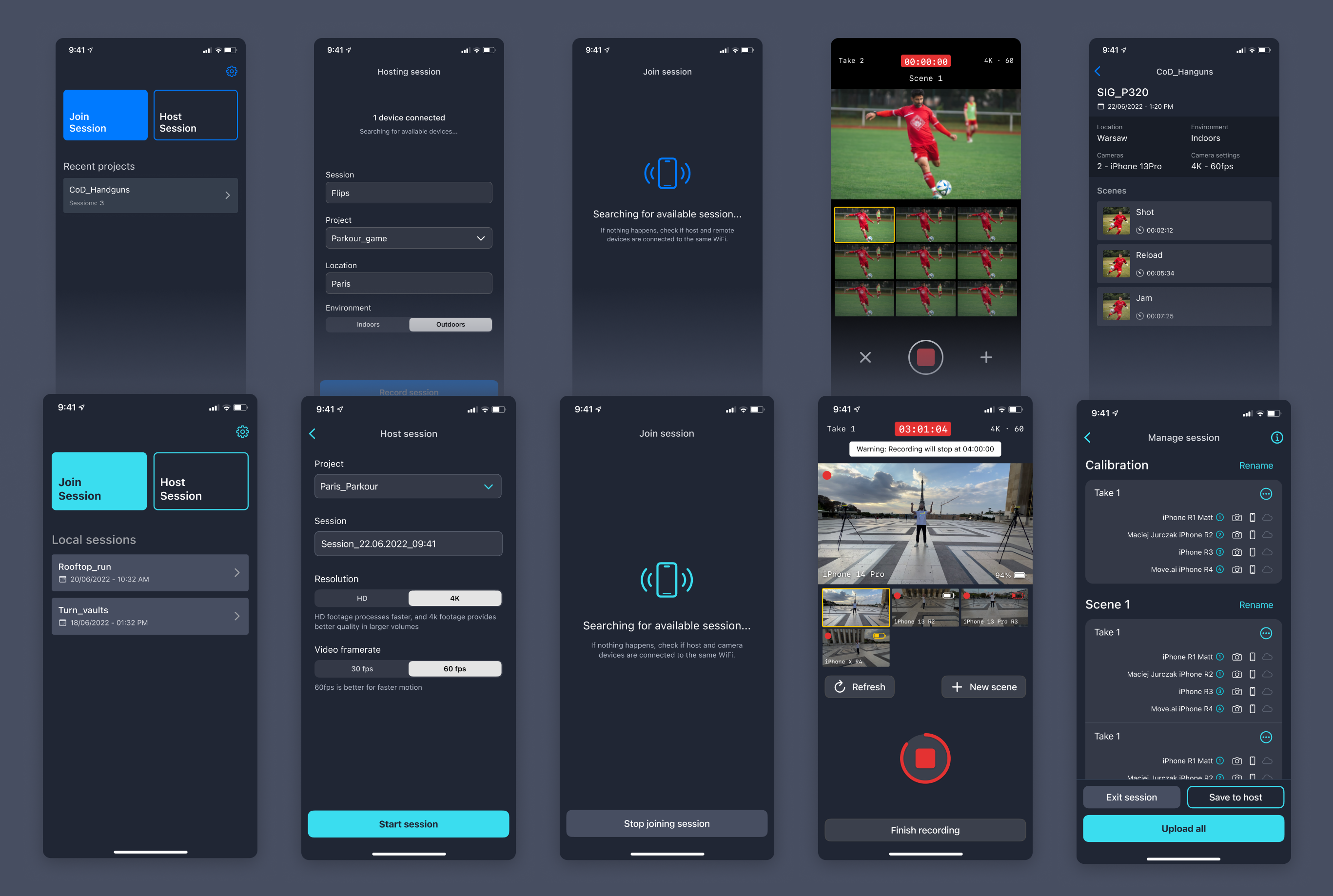
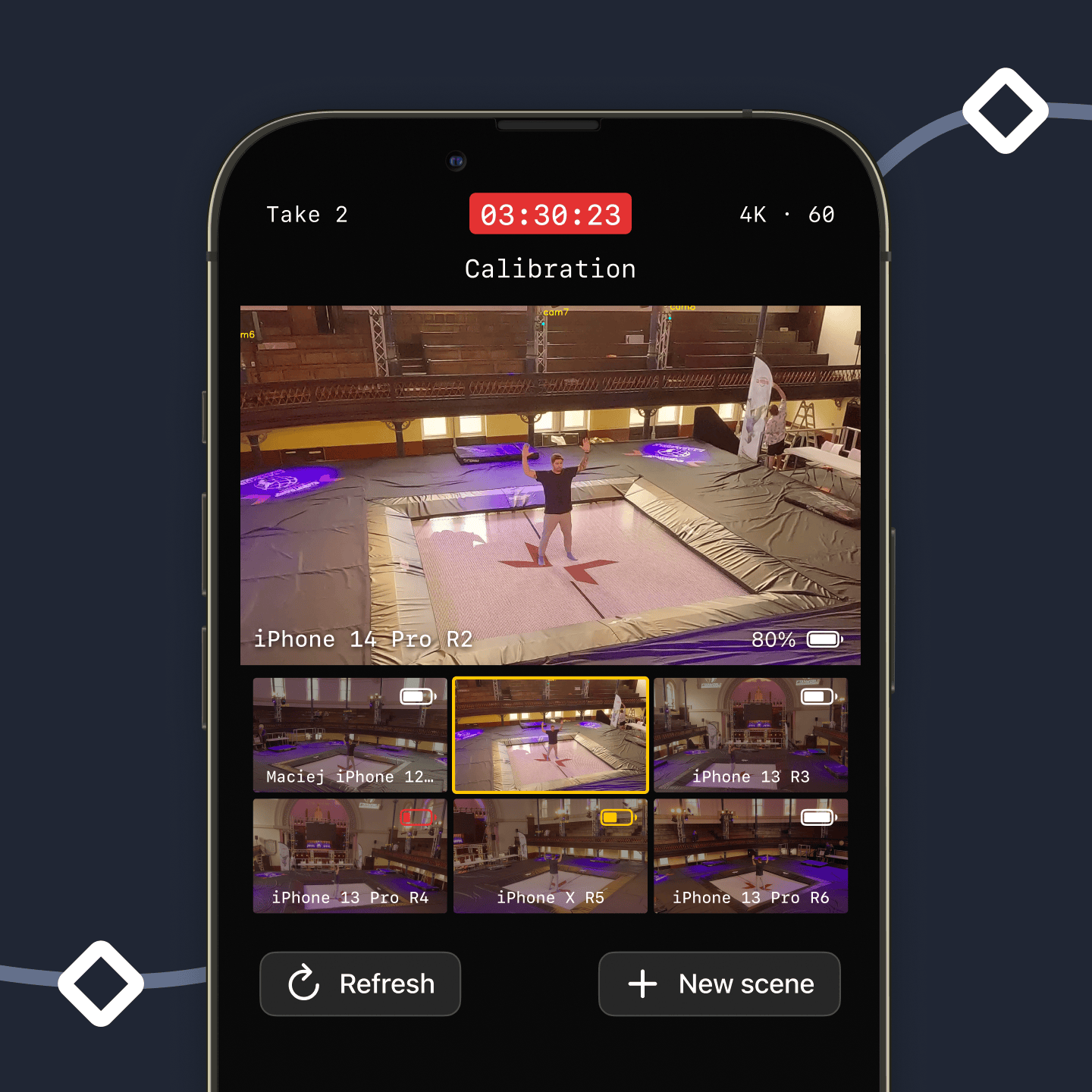
Up to six recording devices, one host, iPhone 8 onward. The host carries every device's identity, battery, storage, connection, recording state and temperature, because the operator's situational awareness is limited to what one screen tells them. A phone six metres away that is hot, nearly full, or silently dropped is invisible otherwise, and each of those ruins a take that has already been performed.

Interface language borrowed from professional video tools rather than consumer camera apps. SF Symbols and SF Font over the brand typeface, which lost legibility at the densities a six-device status screen needs. Design system on Figma styles and variables, handed off through Zeplin, chosen over Dev Mode because it onboarded engineers faster, and it exported Swift so type and colour reached the codebase as code.

Impact

EA benchmarked our system against their own optical rig and presented the results at SIGGRAPH 2022: same performer, captured simultaneously, optical markers and eight GoPros, same timecode.

Fast motion

“the shoulders are a really good level… the foot plant, it's pretty solid.”

Sports

“it's very close… not skipping.”

Stairs and floor

“each step, it's really hitting it… that's really important before passing on to a game team.”

Their animation director was explicit that optical remains “the gold standard.” That was 2022, early in my time on the product; by the time I left in 2024 the results were near-identical. Source: SIGGRAPH 2022 talk.

What this result doesn't show: that benchmark used eight GoPros, not the iOS app. It validates the capture system my app was built to feed, not the app itself. My work was making that system usable by people without a mocap engineer.

What it opened

Ubisoft Foster + Partners SEGA Warner Music Group Paramount Nike Don't Nod Sony Meta Epic Games Disney

Users captured horseback riding, skateboarding, breakdance competitions, jetpack flight, swimming, climbing walls, football. None of that is a stage booking, and several couldn't have been captured on a marker-based system at any price, because the constraint was never only cost. It was that the performance had to come to the room.

Swimming, jetpack flight, horseback, a climbing wall: none of them a stage booking.

What I didn't solve

Take quality couldn't be judged in the room

The animation didn't exist until cloud processing, and processing consumed user tokens, so speculative processing meant charging users to find out whether they had anything worth charging for. Operators judged on instinct. Experienced animators coped; new users had no basis for the call.

Calibration quality stayed a gradient

The system read it as binary. And some failures were physics (clothing contrast, loose fabric, overexposure), where instruction was the only intervention available, not the sufficient one.

Reflection

Design that only happens in the design tool converges on the happy path, because the happy path is the only one you meet at a desk.

The hardest decision was choosing not to block

Leaving users free to record without a valid calibration meant knowingly shipping a path to a bad outcome. What made it right was also what made it uncomfortable: there was no real alternative, and choosing instruction over enforcement meant choosing the option that matched what we could verify over the one that looked more rigorous.

What it changed in how I work

If you're designing for a device, use the device in the conditions it will meet, and actively try to break it. I built developer versions on my own machine and tested implementations as they landed.

The overheating warnings exist because we set up on a tennis court in 35°C. The transfer redesign came from watching sessions fail somewhere real. The calibration work came from field testing. The failures that matter live in the room, on the hardware, in the sun.

Want the reasoning behind each decision, the tradeoffs in full, and the method?

The short version

Motion capture had a floor price and a fixed address: rent a stage, book a mocap engineer, spend 30–60 minutes suiting and marking an actor, calibrate, shoot. We were building the opposite: point a few phones at a performer anywhere and get usable 3D animation out.

The design problem was not on the screen. It was in how someone physically arranged cameras in a room, and whether they performed a calibration step whose purpose was invisible to them.

A capture set up wrong was unrecoverable: the performer had already performed, and unlike most software failures there was no free retry.

So the interface's real job was preventing an unrecoverable failure that happened outside the interface. That is why almost every decision below is about giving an operator information they could not otherwise have, in a room I would never see.

Constraints

  • Output judged against optical mocap, by people who use optical mocap professionally
  • Setup happened in physical space, by non-technicians, in locations we couldn't see
  • Large video files, often somewhere with no usable bandwidth
  • Every device was also somebody's phone: battery, storage, interruptions
  • Processing ran in the cloud and consumed user tokens, so nothing could be checked speculatively

Six decisions

01

Standardize on iPhone — and keep re-testing the decision

The call: iPhone only, when the market wanted Android.

Reconstructing motion from several viewpoints depends on knowing the lenses and calibration characteristics of the cameras. Apple exposed that metadata freely and consistently; most Android devices didn't expose enough. Underneath that sat a problem no spec sheet showed: Samsung shipped different camera modules within one model line, so two phones bought under one name behaved differently. We only found it by buying multiple units and comparing.

With hardware fixed, every accuracy question had one answer instead of two: our model, or this particular phone? At a stage where the company's central claim was “this rivals optical mocap,” that ambiguity cost more than the reach we gave up.

Tradeoff: iPhones are expensive. Users asked us directly for Android or a cheaper way in, and we didn't have a good answer beyond being straight with them. That position still lost us people.

What I'd defend hardest: we treated this as a decision to re-test, not a position to hold. Across roughly a year we went back to Android repeatedly and re-ran the comparison, because the cost of being wrong was an entire user segment. Same answer each time, which made it more defensible.
02

One phone as host, not a laptop

The call: dedicate a device to coordination, and recommend four devices when users hoped to hear two.

iOS peer-to-peer APIs made a phone viable as the control surface: live preview streamed from every camera to one screen, commands passed between devices, no infrastructure in the room. A laptop meant more hardware to buy, carry and set up in a field. Keeping the kit to one device type meant the entire cost of entry was a number of iPhones.

The system could technically run on two recording devices. We recommended at least three, because coverage determined output quality.

Tradeoff: one device in the kit records nothing, and our recommendation was always more expensive than the one people wanted to hear.

We held that line deliberately. A user who buys the minimum, gets poor results and concludes the technology doesn't work is a worse outcome than a user who balks at the price. The first one churns and tells people it doesn't deliver.

Also considered: Mac as host, once M1 machines arrived. Postponed: with three iOS engineers and a long queue, a second platform wasn't the highest-value work available.

03

Teach calibration rather than gate on it

The call: don't block recording, even knowing bad captures would get through.

Calibration was the single biggest failure point in beta and early release. It had to be recorded per session for the specific arrangement in that specific space, not a one-time setup users could learn and forget. Some recorded a poor calibration; others shot straight past it, unaware the system needed one at all.

We explored hard-gating. The obstacle was that we couldn't validate calibration at capture time. Processing ran in the cloud, users were frequently offline, so the app could confirm a calibration had been recorded but never that it was good. A gate on an unverifiable check stops the user who shot nothing while waving through the user whose calibration was poor, and the second was the more common failure.

So: a dismissible in-app notification with an on-demand video, at the moment of use. The modal we rejected as too intrusive for something recurring every session. The notification was tuned for two audiences at once: unmissable to a new user as a signal there's something here they don't know, dismissible in a second on someone's fiftieth capture.

The underlying problem was never that the button was hard to find. The step's purpose was invisible, so it read as skippable.

Tradeoff: experienced users get reminded forever, and because we chose not to gate, poor calibrations still reached processing. We reduced the failure; we didn't eliminate it.

Result: it stopped being the top failure our sales engineers reported from the field, visible across their observations, server-side processing analytics, and direct user reports. That third source taught us the most: users whose calibration passed but was mediocre still got poor animation. Quality was a gradient the system could only read as binary.

04

Split the control path from the data path

The call: reject both options on the table and break the premise underneath them.

Originally everything routed through the host: each phone transferred its full footage over peer-to-peer, the host reviewed, the host uploaded. Coherent: one place to review, one to upload, one mental model. It held up in controlled testing and failed in the field, where consolidating every take before anything could upload met congested Wi-Fi and electrical interference. When it failed late, the whole session's transfer was gone.

The obvious options were to harden the hub with resumable transfers, or move files off the hub and lose centralized review. The premise worth breaking was that review and transfer had to travel together.

Preview stayed on the host but became a stream rather than a transfer, so the operator still saw every camera without files consolidating. Upload became a command: one tap on the host, and every phone independently uploads its own footage. The operator's experience is unchanged. The heavy data no longer makes an extra hop.

The three-column scenario designer: modules and intents, step list, and the Question configuration panel

Tradeoff: partial failure became possible: three phones succeed, one doesn't, a state that couldn't exist before.

We designed for it rather than treating it as unlikely. Sessions were shot in unpredictable radio environments; a device failing occasionally was routine, not an exception to plan around.

Result: every signal moved the same direction, none of them precise: fewer server-side errors, fewer phone-side analytics events, fewer support tickets about stuck transfers. And the new path became what users defaulted to, which was its own answer about which model fit the work.

05

Decouple capture from connectivity

The call: never block a capture on having a connection.

The product's advantage over stage-based mocap was working anywhere. The places that made that advantage worth having frequently had no usable bandwidth. Blocking on upload would have reimposed the constraint we were selling against: if you can only capture where you can upload, you have a studio again, just a worse one.

Tradeoff, and not the one I predicted. We assumed users would worry about whether unsent footage was safe, or forget to upload. Neither happened. Phones filled up instead: users bought the cheapest iPhones, which have the least storage, and never cleared footage after uploading.

Two sound decisions collided. Standardizing on iPhone made the kit expensive, so users bought minimum storage. Offline capture then asked those same devices to hold large files indefinitely. Neither decision was wrong alone and I'd make both again, but the interaction produced a failure neither predicted, on the axis we'd optimized away from. Available storage became a first-class status on the host screen as a result.

06

Surface device thermal state

The call: treat overheating as session information, not an OS problem.

This came from the field, not the backlog. In my first month the whole team flew to Portugal for a hackathon to build the first Multi-Cam prototype. We set the rig up on a tennis court in 35°C shade, and under full Mediterranean sun the phones began to overheat mid-session.

No amount of office testing produces that. And the reasoning it forced generalizes: on a single-device app, overheating is visible because the phone is in your hand. With three phones on tripods behind you, you find out after the take is ruined. The host device was the only place that knowledge could usefully live.

The three-column scenario designer: modules and intents, step list, and the Question configuration panel

Tradeoff: more status competing for space on a screen whose job, in that moment, is to stay out of the way while someone directs a performance.

Result: users cited it unprompted as useful given the conditions they shot in. That week produced a working prototype and a set of requirements nobody had written down. Its real value was discovering in month one which failures this product would have.

The shipped app

The three-column scenario designer: modules and intents, step list, and the Question configuration panel

"Up to six recording devices, one host, iPhone 8 onward. The host manages recording, scene naming and upload, and carries every device's identity, battery, storage, connection state, recording state and temperature."

That list is the answer to a problem that isn't obvious until you build a multi-device product: the operator's situational awareness is limited to what one screen tells them. A phone six metres away that is hot, nearly full, or silently dropped is invisible otherwise, and each of those ruins a take that has already been performed.

The three-column scenario designer: modules and intents, step list, and the Question configuration panel

Preview streams from every camera over peer-to-peer, so framing and coverage are confirmed before anyone performs. It's the only point where a bad setup is still cheap to fix.

Craft decisions worth naming

The interface takes its language from professional video tools rather than consumer camera apps. These were animators and studio staff who already lived in production software, and a six-device session with scene naming is a production tool regardless of what it runs on. SF Symbols and SF Font throughout instead of the brand typeface, which lost legibility at the densities a six-device status screen needs; clarity beat brand consistency. Supporting iPhone 8 onward meant every layout worked across Face ID and Home button devices and every screen size.

Design system

Component library and documentation on Figma styles and variables, with handoff through Zeplin rather than Dev Mode, chosen because it onboarded the engineers faster, and it exported Swift for styling, fonts and colours so type and colour reached the codebase as code rather than as values retyped from a spec. Not formally managed tokens with a pipeline; the right investment level for the team's size. With one designer and three engineers shipping continuously, the system was about throughput more than polish.

Impact

EA benchmarked our system against their own optical rig and presented the results publicly at SIGGRAPH 2022: same performer, captured simultaneously by both, same timeline, same timecode.

Fast motion

“the shoulders are a really good level… that posture is really good. You can see the foot plant, it's pretty solid.”

Sports movement

“it's very close… you can see the feet when he's jumping around, it's not skipping.”

Floor and stairs

“each step, it's really hitting it… he'll land right on the floor. That's really important before passing on to a game team.”

Props

Tested against a chair rebuilt 1:1 in 3D, for accuracy against set pieces.

An incumbent's animation director, on a conference stage, saying a consumer-camera system produced output close enough to hand to a game team, while being explicit that optical remains “the gold standard.” That was 2022, early in my time on the product; by the time I left in 2024 the results were near-identical. Source: SIGGRAPH 2022 talk.

What this result doesn't show: that benchmark used eight GoPros, not the iOS app. It validates the capture system and pipeline my app was built to feed, not the app itself. My work was making that system usable by people without a mocap engineer, which is a different contribution from the accuracy result.

What it opened

Ubisoft Foster + Partners SEGA Warner Music Group Paramount Nike Don't Nod Sony Meta Epic Games Disney

Most sessions were ordinary: apartments, rooms, small studios. But none of that list is a stage booking, and several couldn't have been captured on a marker-based system at any price, because the constraint was never only cost. It was that the performance had to come to the room.

The number that mattered was never how many people used it. Motion capture had been gated behind a stage, a technician and a budget that assumed a studio. Small studios, indie developers and individual creatives could now put mocap into a production without booking anything, which had not previously been realistic at any level of enthusiasm.

What I didn't solve

Take quality couldn't be judged in the room

An operator could replay the video, but the animation didn't exist until cloud processing, and processing consumed user tokens, so speculative processing meant charging users to find out whether they had anything worth charging for. Operators judged on instinct. Experienced animators got good at it; new users had no basis for the call, and that asymmetry was never designed away.

Mitigating context: markerless output was never meant to be final, and neither is optical; animators clean up million-dollar captures too. The bar was “less work than keyframing from scratch,” not “perfect.” That took pressure off the judgment call without removing it.

Calibration quality stayed a gradient

The system knew a calibration had been recorded, not whether it was good. Everything downstream inherited that blind spot.

Some failures were physics

Clothing matching the background, loose fabric obscuring body proportions, direct overexposure. We taught it in the preparation video. Teaching only reaches the user who watches: the weakest intervention available, used because it was the only one on offer.

Reflection

Design that only happens in the design tool converges on the happy path, because the happy path is the only one you meet at a desk.

The hardest part wasn't a decision

It was the file and device management system. Connecting devices, moving footage, and representing all of it accurately was the deepest design problem in the product. A device drops mid-session; one upload fails while three succeed; a phone fills; a transfer stalls in a congested radio environment. Several failures originated system-side, and the interface still had to explain them to someone in a car park with a performer waiting. A screen showing four devices looks trivial until you enumerate what four devices can be doing at once.

The hardest decision was choosing not to block

Leaving users free to record without a valid calibration meant knowingly shipping a path to a bad outcome. What made it right was also what made it uncomfortable: there was no real alternative, and choosing instruction over enforcement meant choosing the option that matched what we could verify over the one that looked more rigorous.

What I'd do differently

Less than I'd like to claim. These decisions were argued out with the PM and the iOS team, and most were made after real disagreement. The one I'd revisit is calibration: instruction treated the symptom. What we discussed and didn't pursue was making calibration something the device could establish rather than something the user had to perform: ARKit, or LiDAR-based spatial understanding. LiDAR was new and limited to higher-end iPhones, and we were already asking users to buy several devices. The constraint was real, and it's the piece I'd most want another run at.

What it changed in how I work

If you're designing for a device, use the device in the conditions it will meet, and actively try to break it. I built developer versions on my own machine and tested implementations as they landed.

Everything here I'm proud of came from that. The overheating warnings exist because we set up on a tennis court in 35°C. The transfer redesign came from watching sessions fail somewhere real. The calibration work came from field testing. The failures that matter live in the room, on the hardware, in the sun.

Got an interesting problem? Let's solve it.

Email maciej@jurczak.me Back to All work
© 2026 Maciej Jurczak Warsaw / --:-- / 52.2317N / 21.0061E